Google Business Profile optimization is the process of making a business profile accurate, complete, trustworthy, and easy to act on so Google can match it with relevant local searches. The work begins by confirming eligibility, securing ownership, choosing accurate categories, completing location and service data, earning reviews and visual proof, and then connecting profile actions with leads and revenue.
This guide targets “Google Business Profile optimization” and related searches such as “how to optimize Google Business Profile,” “how to rank higher on Google Maps,” and “how to appear on Google Maps.” It focuses on profile implementation. For the wider system of websites, citations, location pages, links, and reputation, read the complete local SEO guide for Indonesian businesses.
Editorial note: George Vie, Head of Digital Marketing at LINC, wrote this article from profile-audit, keyword-mapping, tracking, and lead-evaluation workflows used in digital marketing work. Policy recommendations were checked against official Google Business Profile documentation on July 28, 2026. Features vary by category, region, and profile status; use only the options available in your account.
Google Business Profile optimization summary
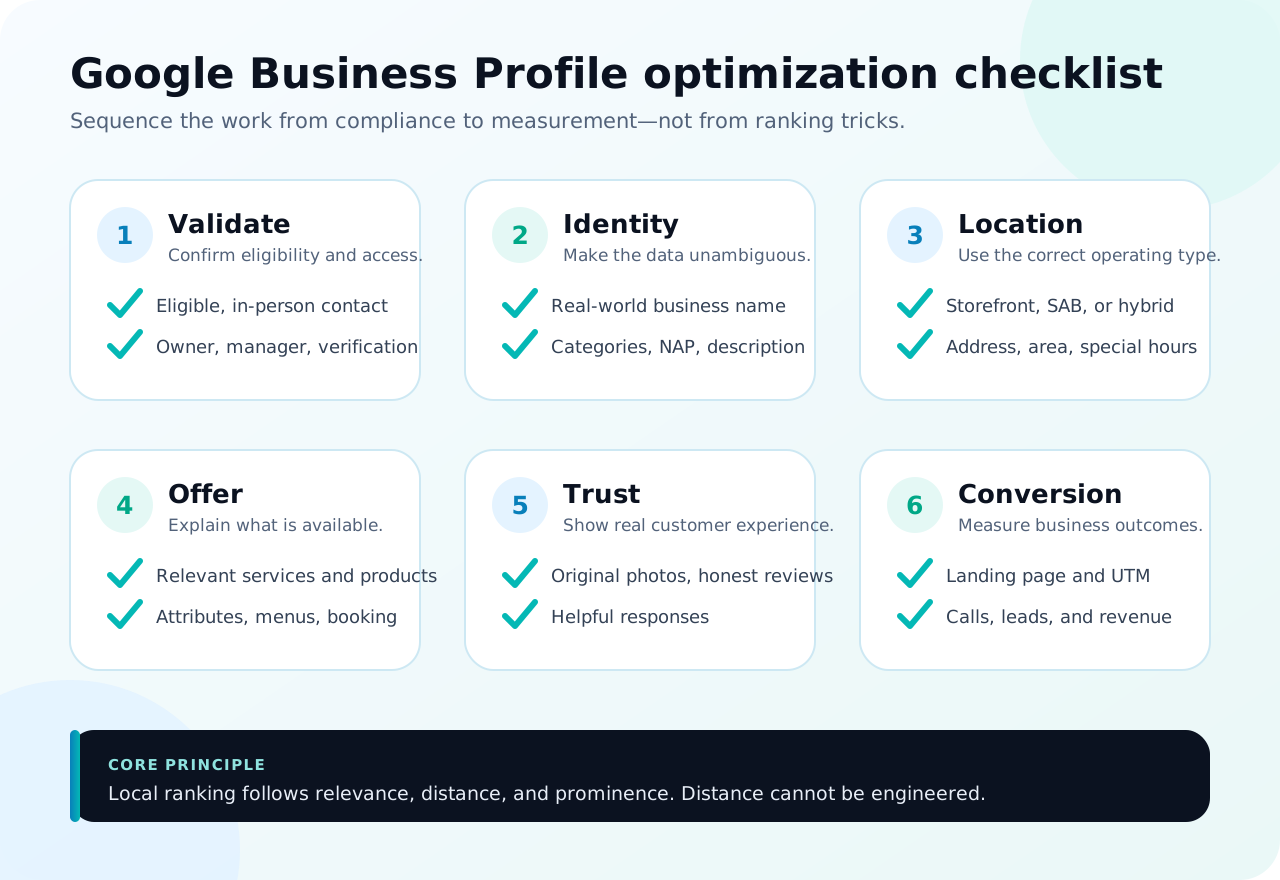
If you only have time for one audit, work in this order:
- Confirm that the business is eligible and that no duplicate profile exists.
- Keep primary ownership in a company-controlled account; add the team as owners or managers.
- Claim and verify the profile through a method offered by Google.
- Use the business name as customers know it in the real world, with no added keywords.
- Select one specific primary category and only genuinely relevant additional categories.
- Complete the address, service area, phone, URL, regular hours, and special hours accurately.
- Add available services, products, attributes, a description, and category-specific features.
- Upload original photos that help customers recognize the location, products, team, and process.
- Ask real customers for reviews without incentives or review gating; reply helpfully.
- Link the profile to the right website page and apply UTM parameters.
- Measure search terms, views, calls, directions, website clicks, bookings, leads, and revenue.
- Audit changes, access, reviews, media, and performance monthly.
This list does not guarantee the top position. Google says local rankings are primarily based on relevance, distance, and prominence. You can strengthen relevance and prominence. You cannot legitimately engineer a searcher’s distance.
Is your business eligible?
Do not begin with categories or a description until you answer this question. Under Google’s eligibility guidelines, a business generally must make in-person contact with customers during its stated hours. Shops, clinics, restaurants, customer-facing offices, technicians who travel to customers, and delivery services may qualify when they meet the applicable requirements.
Businesses that are generally ineligible include online-only companies with no face-to-face interaction, lead-generation companies, rental or for-sale properties without an eligible sales office, and addresses that are P.O. boxes. A virtual office does not automatically qualify. Google requires a real location; a co-working space can only be used when the business maintains clear signage, is staffed by its own team during business hours, and actually receives customers there.
Use one profile for one business at one location. Before creating anything, search the business name, address, and phone number on Google Search and Maps. If a profile already exists, claim it or request access. A second profile can split reviews, create conflicting data, or trigger duplicate handling.
Choose the profile type: storefront, service-area, or hybrid
Location settings must reflect how the business actually serves customers.
| Type | How the business operates | Correct setup |
|---|---|---|
| Storefront | Customers visit a staffed location with permanent signage | Show the address and hours when customers can be served |
| Service-area business (SAB) | The team travels or delivers to customers; customers are not served at the business address | Hide the address and enter the cities, postcodes, or areas actually served |
| Hybrid | Customers can visit and the business also travels or delivers | Show an eligible address and enter the service area |
Google’s service-area guidance says service areas are selected by city, postcode, or another available area—not by radius. A profile can include up to 20 service areas, and the overall boundary should generally remain within about two hours of driving time from the business base.
Do not expose a home address if customers are not served there. Do not create fake locations in cities you want to target. A service area helps customers understand coverage; it does not make a business rank automatically at every point inside it.
Secure ownership and verification
The profile is a business asset. Primary ownership should sit in a recoverable, company-controlled account rather than only with an employee, freelancer, or agency. Add each person as an owner or manager so the team never needs to share a password. Owners can manage access; managers can handle most day-to-day work.
Maintain a record of:
- the primary owner and a backup owner;
- active managers and why they need access;
- the latest verification date;
- the name, categories, address, phone, and URL before major changes;
- operating documents that support the business name and location;
- the person who approves profile changes.
Google determines which verification methods are available to each profile. Options may include video, phone, text, email, live video, or mail; a business cannot always choose every method. Follow the instructions shown and prepare evidence of a real business, such as signage, access to the premises, work equipment, or relevant documents. Do not promise a fixed verification time because methods and review times vary.
When another party manages an existing profile, use the request access workflow rather than creating a duplicate. Once access is restored, audit users and remove accounts that no longer need it.
Use the correct business name
The profile name must match the name used consistently on signage, the website, business documents, and customer-facing material. Do not add a city, service, “best,” “cheap,” a phone number, or opening hours unless that wording is part of the real-world name.
Example:
- Correct:
Sentosa Health Clinic - Risky:
Sentosa Health Clinic Best Dentist Jakarta Open 24 Hours
Keyword stuffing may look tempting when competitors do it, but it violates Google’s business representation guidelines. A stable name also reduces the risk that customers cannot recognize the business or that the profile requires reverification after a material change.
If the business is rebranding, prepare evidence before editing the profile: signage, the website, documents, and customer communications. A name change that materially changes identity may be treated differently from a minor correction.
Select primary and additional categories
The primary category answers “what is this business,” not every activity it can perform. Choose the most specific category that represents the core business. An Italian restaurant should use an available category describing that restaurant type rather than a generic option when a more precise category fits.
Use additional categories only for genuine lines of business. Do not add every category a competitor uses. An inaccurate category can expose the profile to the wrong searches, reduce lead quality, or create policy problems.
Use this process:
- Record the primary source of revenue and services that are actually available.
- Find the most specific category that represents that business.
- Compare the categories of profiles appearing for relevant queries as research—not as instructions to copy.
- Select additional categories only when the business has the team, offer, and operational proof.
- Log the change date and monitor queries and leads afterward.
Categories can change and differ by country. A material change may also trigger review or reverification. Change categories for a documented reason, not whenever rankings fluctuate.
Complete NAP, hours, URL, and contact details
NAP stands for name, address, and phone. This data should be clear to customers and consistent across the profile, website, contact page, important directories, and primary social accounts. For listing audits and citations outside Google, follow the citations and NAP consistency guide.
Check these details:
- use a phone number connecting directly to the location or business team;
- enter a precise address, including a unit or floor when necessary;
- show hours when customers can actually receive service;
- add special hours for public holidays, events, and seasonal changes;
- point the website URL to a page relevant to the location or service;
- verify that the map pin does not land on the wrong building or road.
Consistency does not require every platform to use letter-for-letter address abbreviations. The goal is one entity customers cannot confuse. An old phone number, another branch’s address, incorrect hours, or a business name that keeps changing is more harmful than a harmless formatting difference.
For a multi-location company, each profile needs the phone, location page, hours, and information belonging to that branch. Do not point every profile at a generic homepage when a useful location page exists.
Write the description for customers, not keywords
A useful business description explains:
- who the business serves;
- its primary products or services;
- the relevant area or context;
- a differentiator that can be supported;
- important operating information.
Use this structure:
“[Business name] helps [audience] with [primary service] in [relevant area]. The team handles [important scope] through [process or evidence]. Customers can [how to buy or make contact].”
Write naturally and specifically. Avoid repeated city lists, unsupported “number one” claims, promotional pricing, excessive capitalization, and links inside the description. Google says descriptions should be relevant and helpful; links, promotions, and price-focused copy are not permitted in that field.
The description helps customers understand the business, but placing a keyword there does not automatically improve rankings. Categories, data completeness, the website, reputation, distance, and overall fit still matter.
Add services, products, and attributes
Categories describe the business type. Services and products explain what customers can choose. Add only what is currently available and use terms prospects understand.
For service businesses:
- group services by customer need;
- write a short description of the outcome, scope, and limits;
- include prices only when accurate and supported by the profile format;
- avoid creating dozens of keyword variants for the same service;
- link to a website page that explains the service in more depth.
Retail, hospitality, and food businesses can use products, menus, ordering, booking, and available attributes. Attributes such as accessibility, parking, dine-in, delivery, or appointment requirements help customers filter choices. Availability depends on category and region.
Audit these items monthly. A discontinued product, broken booking link, or outdated attribute creates more friction than a profile that intentionally uses only relevant features.
Use photos and video as evidence
The best photos are not simply numerous. They answer customer uncertainty. Prioritize:
- the exterior from the direction customers approach;
- signage and the entrance;
- interior and facilities;
- products or service outcomes;
- the real team at work;
- a safe or professional process;
- parking, lifts, waiting areas, or other decision-critical details.
Google recommends JPG or PNG photos between 10 KB and 5 MB. Use bright, focused images that represent current conditions. Avoid stock images that prevent customers from recognizing the business, excessive filters, watermarks covering the subject, and material that violates privacy.
For video, show a useful short sequence: finding the entrance, the atmosphere, a product demonstration, or a service process. There is no need to force daily uploads. Update media when something materially changes, the collection does not answer a common question, or old content no longer represents the business.
Earn reviews without violating policy
Reviews help customers evaluate an experience and can contribute to local prominence. Review volume is not a reason to take shortcuts. Use the guide to getting Google reviews ethically to build a safe request and reply workflow. Google’s review guidance prohibits offering goods or discounts in exchange for posting, changing, or removing reviews.
Use a safe workflow:
- Ask after a genuine customer experience has finished.
- Use the profile’s official review link or QR code.
- Request feedback neutrally rather than only approaching customers likely to give five stars.
- Never write the review for the customer or use employee accounts.
- Do not offer a gift, prize draw, discount, or compensation.
- Reply to positive and negative reviews like a real person.
Keep replies concise, specific, and free of private customer information. For a negative review, acknowledge the experience, explain the limits of what can be discussed publicly, and move resolution to a private channel. Do not argue or insert keywords mechanically.
Treat review themes as research. If customers repeatedly mention speed, access, cleanliness, or communication, use the insight to improve operations, the website, and profile material—not to manipulate what reviewers say.
Use posts selectively
Google Business Profile may offer updates, offers, or event posts depending on the profile. Posts are useful for timely information: a service change, product release, event, offer with clear terms, or a short guide that helps customers act.
Under Google’s posts documentation, a post can contain a description, photo or video, and an action button. A phone number in the post description may cause rejection; use the call button linked to the verified profile number. Older posts can be archived, so important operating information should remain in the correct profile fields.
Do not treat a posting frequency as a guaranteed ranking factor. Publish when the information is useful and measure whether it supports customer action.
Connect Google Business Profile to the website
The profile supports discovery. The website resolves more complex questions. Link to a page that:
- matches the profile’s location and service;
- contains consistent NAP and hours;
- explains the offer, process, proof, and service area;
- provides a clear call, WhatsApp, booking, or form action;
- is fast, mobile-friendly, indexable, and easy to understand.
Add UTM parameters to the profile’s website URL so GA4 can separate this traffic:
https://linc.id/location-page/
?utm_source=google
&utm_medium=organic
&utm_campaign=google_business_profile
For multiple locations, add a consistent location identifier to campaign or content parameters without including personal information. Example: utm_campaign=gbp_south_jakarta. Document the standard so a team does not fragment reporting across gmb, googlemaps, and GBP.
The website also strengthens business context through service pages, location pages, internal links, proof, citations, backlinks, and structured data. For a branch or service-area structure, use the location-page guide for local SEO. This is why profile optimization should sit inside a wider local SEO strategy instead of operating as a standalone project.
Audit the five competitors that actually appear
Do not judge the profile only against companies your sales team knows. Search one service and area from several customer locations, then record the five profiles that appear most consistently.
Compare:
| Area | What to inspect | Healthy action |
|---|---|---|
| Categories | Primary and additional categories | Identify a possible gap, then validate it against the real business |
| Offer | Services, products, and attributes | Complete only gaps the business genuinely offers |
| Reputation | Volume, rating, recency, themes, and replies | Improve the customer-experience and review-request workflow |
| Visuals | Exterior, interior, team, products, and freshness | Add proof that helps customers decide |
| Conversion | URL, location page, booking, and phone | Reduce friction between discovery and action |
| Authority | Citations, coverage, links, and organic results | Earn trusted sources rather than mass directory listings |
Never copy a name, category, or service that does not fit. Look for patterns across several competitors. If four out of five show clear location evidence and you do not, that is a gap. If one profile stuffs keywords into its name, that is not a practice to follow.
Local positions change by search point. Use a local grid rank tracker where justified, then combine it with query data, profile actions, and leads. One screenshot from the office does not represent the entire market.
Manage multiple locations from one source of truth
A multi-location business needs governance. Build a master record for each location containing:
- name, branch code, address, pin, service area, phone, and hours;
- approved primary and additional categories;
- location URL and UTM format;
- primary owner, managers, and approver;
- services, facilities, photos, and local differentiators;
- verification date and change log;
- profile KPIs, leads, and conversion rate.
Use central standards for identity and security while allowing each location to provide unique proof. Photos, hours, services, access, and local information should never be copied without validating them. Each branch deserves a unique location page when that information materially helps customers.
Avoid undocumented bulk changes. Test on a small group, record the effect, and roll out more widely once the data and operations support it.
Avoid mistakes that create profile problems
Common mistakes include:
- adding keywords to a name that are not part of the real business name;
- creating another profile because access to the first one was lost;
- using a virtual office or an address that does not receive customers;
- exposing a home address for a service-area business;
- selecting categories and services the business does not provide;
- changing the name, address, category, and phone at once with no documentation;
- buying reviews, offering incentives, or review gating;
- leaving a former employee or vendor as the only owner;
- sending traffic to a broken URL or inactive phone number;
- promising a particular ranking as the outcome of optimization.
If the profile is restricted or suspended, do not create a replacement before finding the cause. Audit eligibility, the name, address, duplicates, categories, website, and evidence. Correct the violation and use the official appeal or reinstatement process. Repeated edits without addressing the root problem can make resolution harder.
How to measure optimization results
Business Profile Performance can show metrics relevant to the profile, including search terms, views, directions, calls, website clicks, messages, and bookings. Not every metric is available to every business.
Organize measurement into three levels:
- Visibility: queries, profile views, coverage area, and Maps versus Search.
- Action: calls, directions, website clicks, messages, and bookings.
- Business outcome: qualified leads, appointments, visits, pipeline, revenue, and repeat orders.
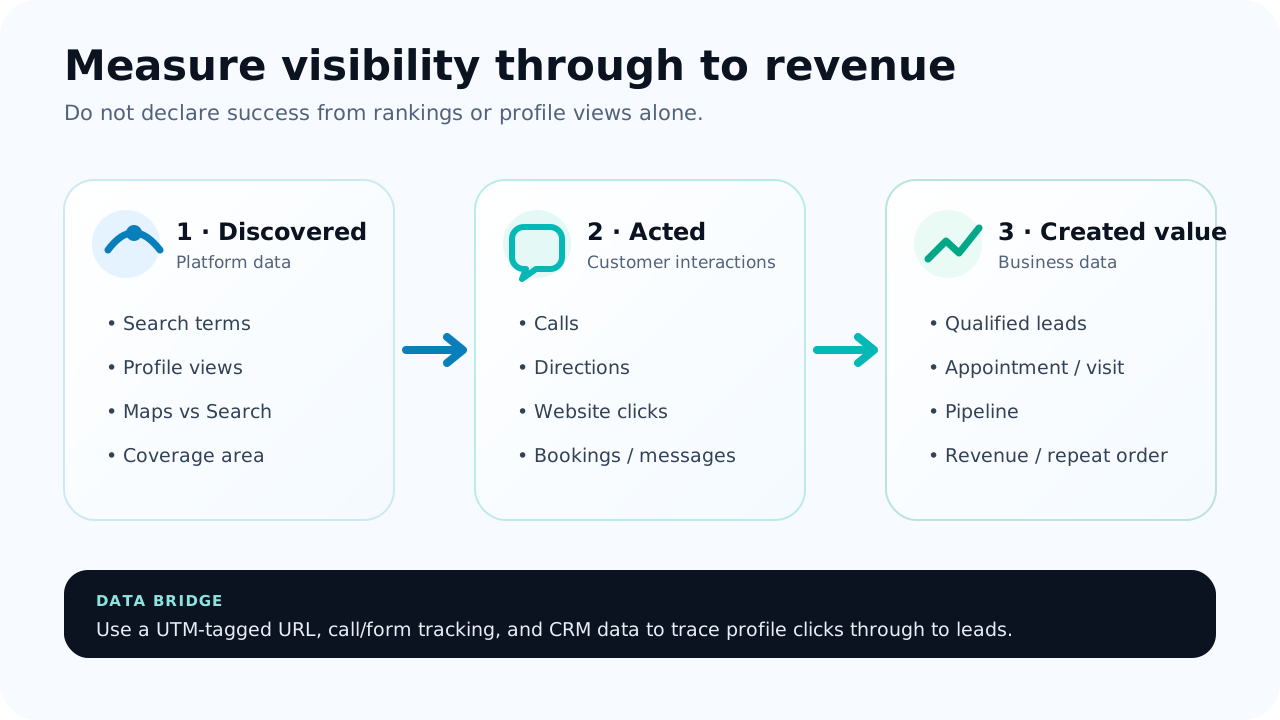
Compare meaningful date ranges and account for seasonality, changing hours, promotions, and operating conditions. Do not change several elements every day and then attribute one increase to one cause.
For calls, record conversation quality rather than only button clicks. For forms and WhatsApp, preserve the source in the CRM. Where operations allow it, compare direction requests with visits or transactions. Attribution will never be perfect, but consistent tracking is more valuable than a ranking number with no context.
Weekly and monthly maintenance checklist
Every week
- reply to reviews and customer questions that need a response;
- inspect information changes suggested by users;
- confirm that the phone, website, booking link, and hours still work;
- upload visual evidence when a change or useful new asset exists;
- record incidents, recurring questions, and lead quality.
Every month
- audit owners and managers;
- check verification status, duplicates, categories, services, products, attributes, and media;
- add special hours for the next period;
- review search terms, actions, leads, and conversion rate;
- compare five competitors for the same queries and search points;
- test UTM parameters, GA4, form or call tracking, and CRM data;
- select one to three changes with the clearest expected impact;
- document the date and the expected result.
Every quarter
- validate eligibility and the location structure;
- audit NAP and location pages on the website;
- review themes in customer feedback and recurring operating issues;
- evaluate categories, new services, seasonality, citations, and authority;
- remove old access and update recovery documentation.
A 30-day optimization plan
| Week | Focus | Output |
|---|---|---|
| 1 | Eligibility, ownership, duplicates, verification, and baseline | A secure profile, clear access, and recorded starting data |
| 2 | Name, categories, location, NAP, hours, description, and services | Accurate and complete core information |
| 3 | Photos, products, attributes, review workflow, website, and UTM | Stronger proof and a tracked conversion path |
| 4 | Competitors, performance, leads, and experiment priorities | A dashboard and maintenance backlog |
Do not wait for the profile to be “perfect” before correcting information that misleads customers. Equally, do not make every material change at once just to finish a checklist. Prioritize accuracy, risk, and impact.
Google Business Profile optimization with LINC
LINC connects profile optimization with SEO strategy, website pages, tracking, and lead operations. An audit can cover eligibility, ownership, duplicates, categories, locations, services, media, reviews, competitors, citations, UTM, GA4, Search Console, and the conversion path.
The deliverable is not a promise of a specific position. The goal is a manageable, policy-compliant profile that helps customers and produces data the business can use.
Read the complete local SEO guide, explore LINC’s digital marketing services, or schedule a consultation to map gaps across your profile and website.
Frequently asked questions
What is the primary keyword for this article?
How can a business appear on Google Maps?
Is Google Business Profile free?
Do keywords in the business name improve ranking?
How many categories should a profile use?
Can a home-based business create a Google Business Profile?
How long does Google Business Profile optimization take to work?
Should a business publish a post every day?
How can a business get Google reviews safely?
Which Google Business Profile metrics matter most?
Sources and further reading
- Google: Tips to improve your local ranking
- Google: Business Profile eligibility and ownership
- Google: Add or claim your Business Profile
- Google: Guidelines for representing your business
- Google: Manage service areas
- Google: Tips to get more reviews
- Google: Business-specific photos
- Google: Create and manage posts
- Google: Understand Business Profile performance
The bottom line
Healthy Google Business Profile optimization makes a business easier to understand, trust, and contact. Begin with eligibility and ownership, then correct the name, categories, location, NAP, hours, services, media, and reviews. Connect the profile to a UTM-tagged website, measure leads through to revenue, and maintain the profile with scheduled audits.
You cannot buy or request a higher organic local ranking. You can build stronger relevance, prominence, customer experience, and conversion paths. To turn this checklist into an impact-ranked backlog, schedule a consultation with LINC.