
A social media content calendar records what will be published, when it goes live, which platform it belongs to, who owns it, and how the result will be evaluated. It connects the goal, audience, brief, asset, approval, CTA, tracking, and decision.
This concise guide includes a social media content calendar template, a completed example, and a workflow your team can use immediately. For platform selection, funnels, and the wider strategy, read the complete social media marketing guide.
Editorial note: George Vie, Head of Digital Marketing at LINC, developed this operational template from brief to review. Examples are illustrative; tracking and metric terminology were checked against primary documentation. Published and reviewed on July 28, 2026.
Download the social media content calendar template
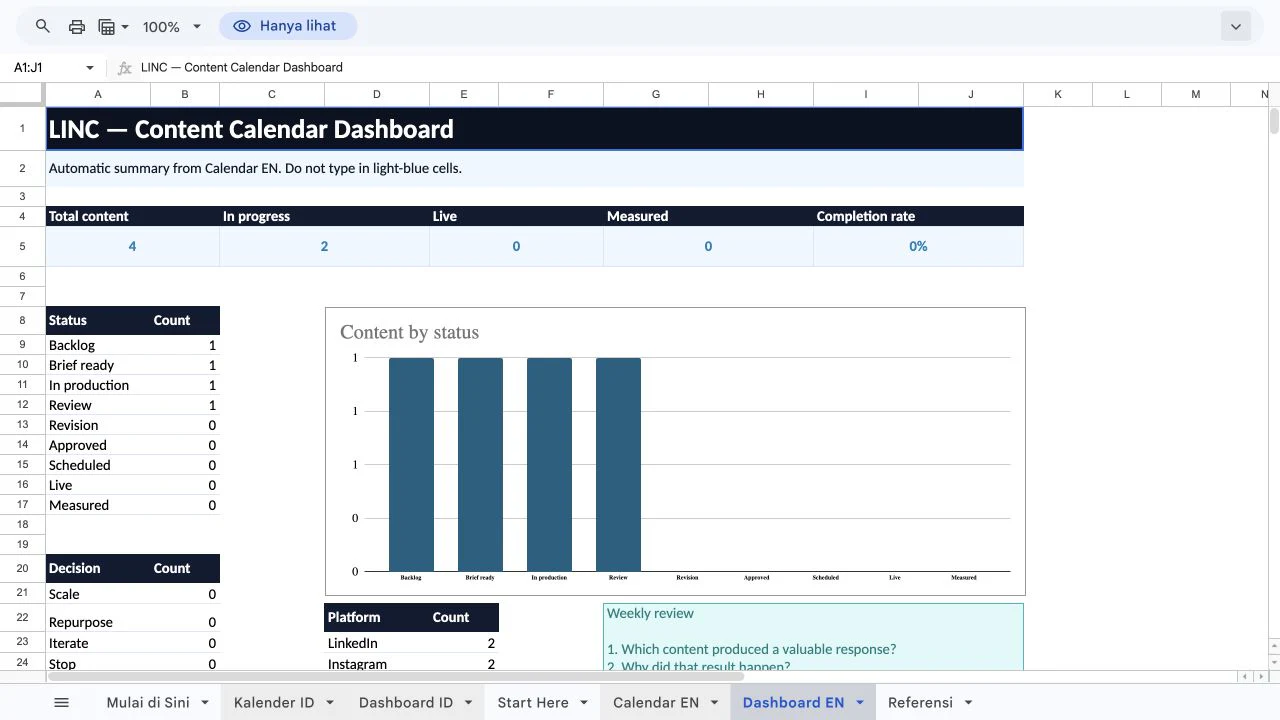
Use the Google Sheets template below as your starting point. It includes instructions, a 21-column calendar, dropdowns, color-coded statuses, completed examples, and automatic dashboards in English and Indonesian.
Free template: use the button below to create a private copy in your Google Drive. The original is view-only, so it remains unchanged when other people use it.
Make a copy in Google Sheets →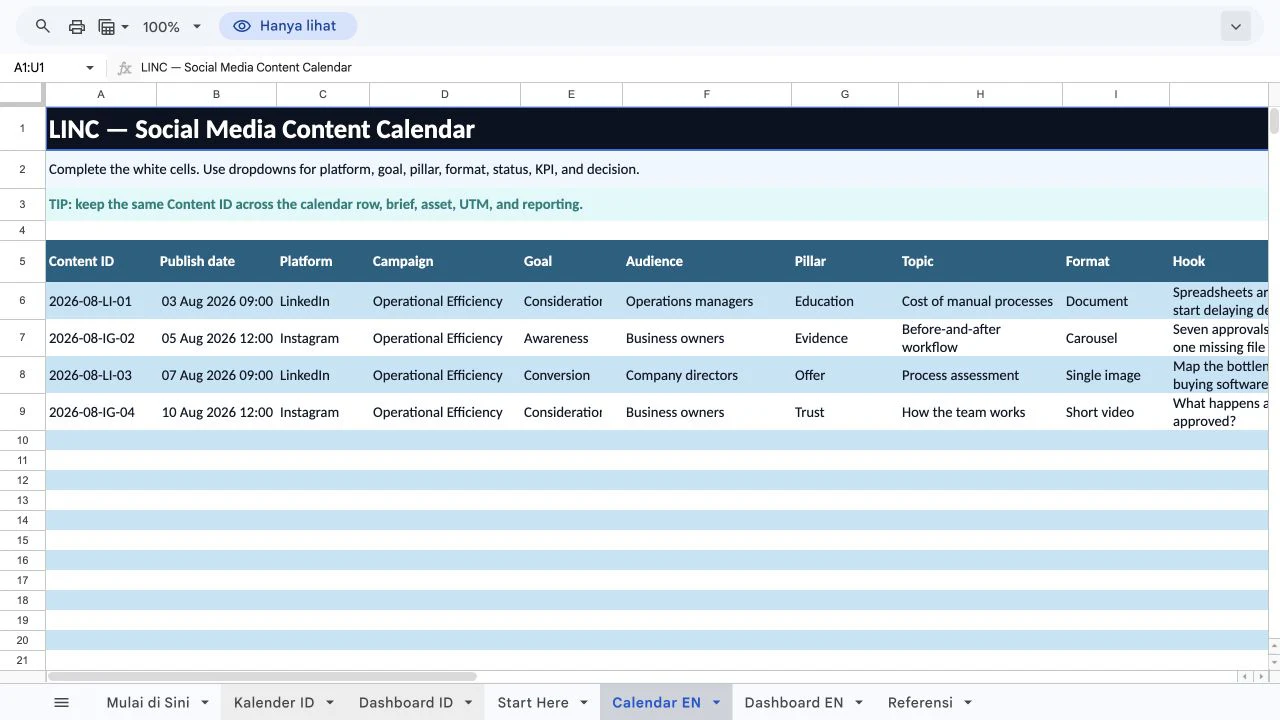
The template contains 21 columns. Small teams can begin with these groups:
| Columns | Purpose |
|---|---|
| Date and platform | When and where it goes live |
| Goal and audience | Who it is for and what should change |
| Pillar and topic | Keep ideas varied |
| Format and hook | Content type and opening |
| Main message and CTA | One message and next action |
| Owner, approver, status | Responsibility and progress |
| Asset and destination | Final file and target URL |
| UTM/content ID | Connect a post with website data |
| KPI, result, decision | Record what happened and what comes next |
Do not remove the goal, audience, owner, CTA, KPI, or decision. Without them, a calendar becomes a list of dates with no useful context.
How to create a social media content calendar
Use these six steps to turn an empty template into a realistic monthly social media content calendar.

1. Define the goal and audience
Give each post one primary job: awareness, consideration, conversion, or retention. Then describe a specific segment, such as “mid-market marketing managers who need to prove ROI,” rather than “all business owners.”
2. Give every platform a role
Platforms do not need the same frequency. LinkedIn may support B2B education, Instagram visual explanations, TikTok discovery, and WhatsApp follow-up. Choose based on audience behavior and capacity.
3. Choose three to five content pillars
Use consistent pillar names so the schedule is easy to scan:
| Pillar | Example content |
|---|---|
| Education | Tutorial, checklist, FAQ |
| Evidence | Case study, demonstration, customer story |
| Point of view | Trend analysis or project lesson |
| Trust | Behind the scenes or expert profile |
| Offer | Demo, webinar, assessment, or consultation |
Results and testimonials must be verifiable. Label anonymous or hypothetical examples clearly.
4. Add a short content brief
Each row only needs to answer five questions:
- Who is the audience?
- Which problem does the content address?
- What is the one message they should remember?
- Which evidence supports it?
- What should they do next?
Add the format, deadline, owner, and approver. If the main message needs several paragraphs, refocus it.
5. Schedule around real capacity
Account for research, production, review, revision, and scheduling. Let capacity and audience needs determine frequency. Leave room for timely responses.
6. Assign a KPI and decision
Choose one KPI. After measurement, label the result Scale, Repurpose, Iterate, Stop, or Learn. Record both the result and decision.
Social media content calendar example
This compact example shows how a B2B team could fill the calendar:
| Date | Platform | Pillar | Topic and format | CTA | KPI | Status |
|---|---|---|---|---|---|---|
| Aug 3 | Education | Cost of manual work — document | Save checklist | Saves | Review | |
| Aug 5 | Evidence | Before-and-after workflow — carousel | View case study | Profile visits | Production | |
| Aug 7 | Offer | Process assessment — image | Request assessment | Qualified leads | Brief | |
| Aug 10 | Trust | How the team works — reel | Open WhatsApp | WhatsApp clicks | Backlog |
Production and approval workflow
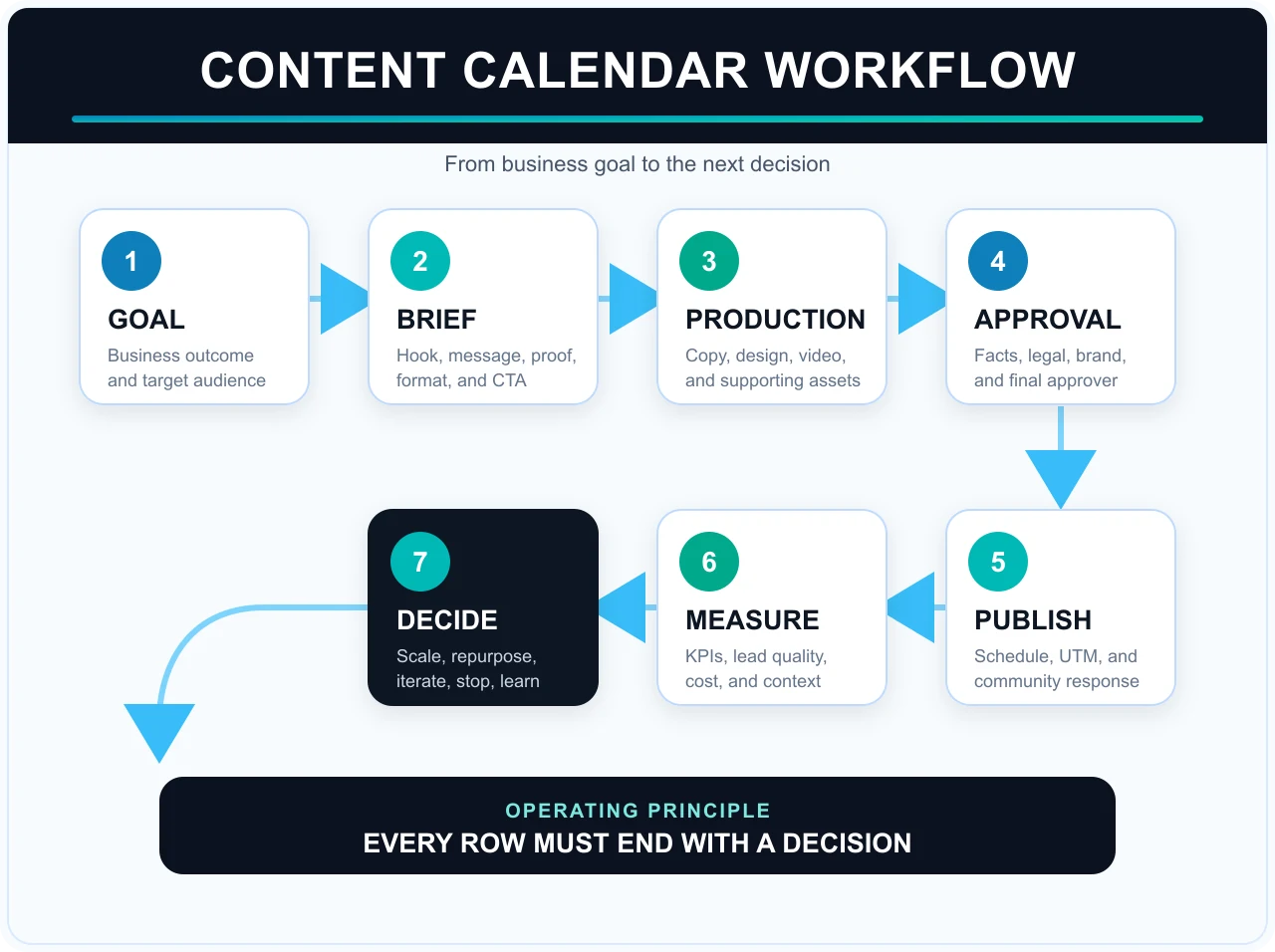
Use statuses with one clear meaning:
- Backlog: the idea has not been prioritized.
- Brief ready: the audience, message, evidence, and CTA are complete.
- In production: copy and creative are being produced.
- Review: one final approver is checking the work.
- Revision: requested changes are underway.
- Approved: content is final.
- Scheduled: entered into the publishing tool.
- Live: published.
- Measured: the result and decision are recorded.
Keep feedback and assets in one place. Use the same content ID in the calendar, brief, file name, UTM parameter, and dashboard.
Add UTM parameters and KPIs
Add UTM parameters when content sends people to a website:
https://linc.id/en/solutions/digital-marketing/
?utm_source=linkedin
&utm_medium=organic_social
&utm_campaign=content_calendar_guide
&utm_content=document_01
Use lowercase values, avoid spaces, keep campaign names stable, and never put personal data into a URL. Google Analytics documentation explains campaign parameters.
Match the primary KPI to the objective:
| Objective | Primary KPI |
|---|---|
| Awareness | Reach or qualified views |
| Engagement | Saves, shares, or meaningful comments |
| Traffic | Engaged sessions |
| Leads | Qualified leads |
| Sales | Pipeline or revenue |
| Support | Resolution rate |
Detailed metric definitions and formulas are available in the social media measurement framework.
Run a weekly review
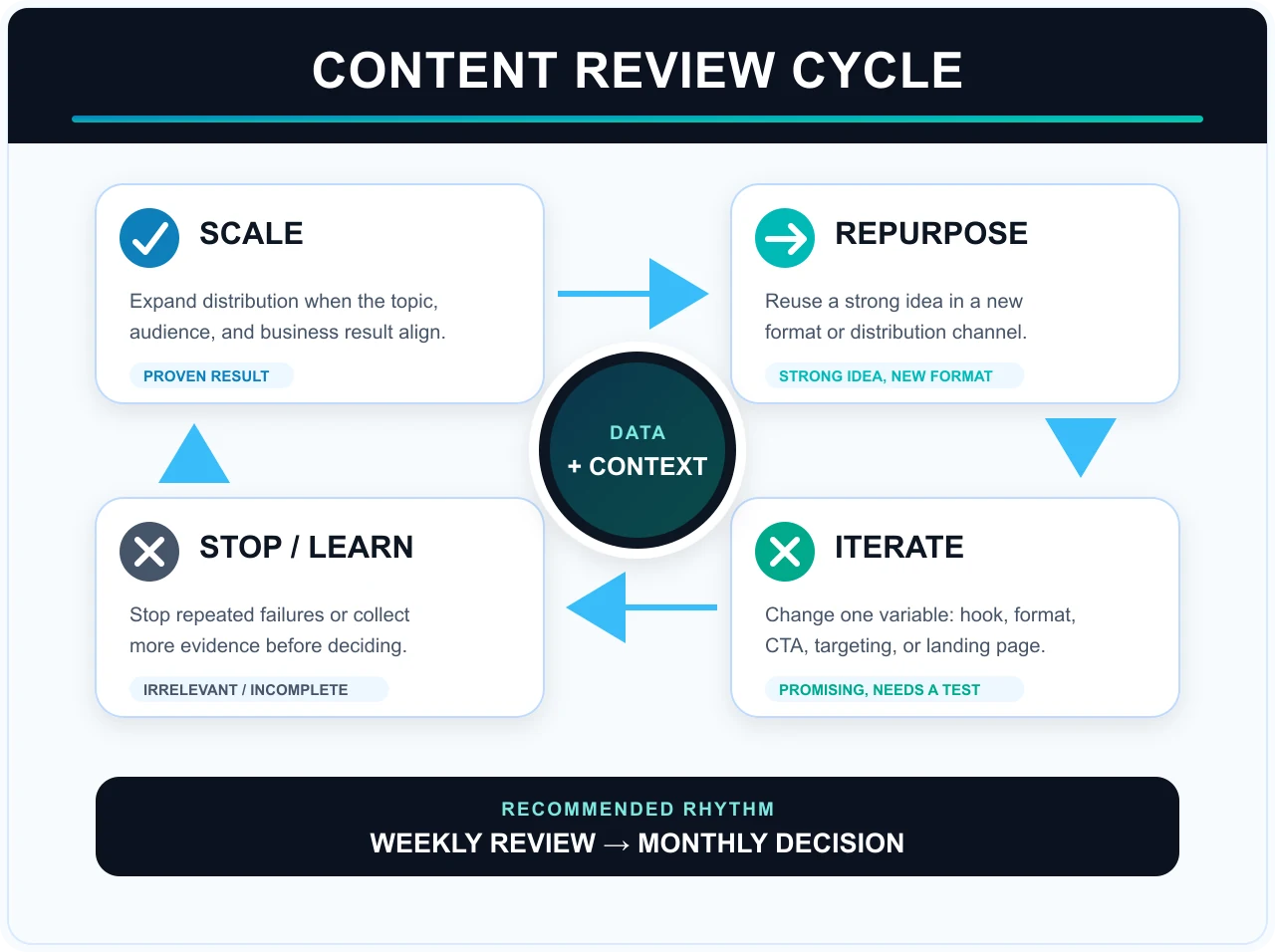
Ask which content produced a valuable response, what caused it, and which decision should follow. High reach from the wrong audience is not automatically a success.
- Scale: proven and worth wider distribution.
- Repurpose: strong enough for another format or platform.
- Iterate: promising, but the hook, format, or CTA should change.
- Stop: repeatedly ineffective or no longer relevant.
- Learn: evidence is not yet sufficient.
Common content calendar mistakes
- Filling dates before defining the goal and audience
- Making promotional posts the majority of the schedule
- Choosing formats beyond production capacity
- Spreading feedback across several chat threads
- Ignoring community-management workload
- Publishing destination URLs without a content ID and UTM parameters
- Recording results without a decision
- Making the calendar too rigid
Build your content workflow with LINC
LINC connects content calendars with landing pages, WhatsApp, paid distribution, tracking, and follow-up so campaigns can be evaluated through qualified leads and revenue. Explore LINC’s digital marketing services or schedule a consultation.
Frequently asked questions
What is a social media content calendar?
What should a social media calendar template include?
How often should a business post?
Which tools can manage a content calendar?
Sources
- Campaign URLs and UTM parameters — Google Analytics Help
- Reach and impressions — Meta Help Center
- Performance metrics — LinkedIn Campaign Manager
The bottom line
Start with a simple template. Define the goal and audience before choosing dates, use clear statuses, tag destination URLs with UTM parameters, and end every reporting period with a decision. A content calendar should not make a team busier; it should make production more deliberate and preserve what the team learns.